
Spotting a phishing message
Six signals, why urgency is the thread running through all of them, and what to do in the first ten minutes after realising you have clicked.
Phishing is the category that security software is structurally worst at stopping, because in the pure case nothing is executed on your machine at all. You are shown a convincing page, you type your password, and the attacker now has it. No file was written for a scanner to examine.
That makes recognition a skill worth having. The good news is that fraudulent messages share a small set of tells, and they share them because the underlying economics force them to.
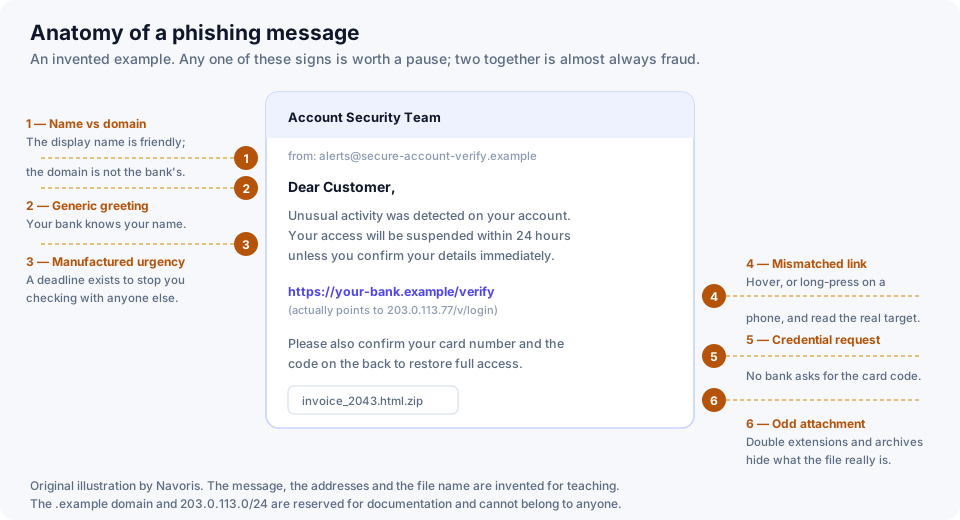
The six signals
1. The display name does not match the domain
Mail clients show a friendly name, and a friendly name can say anything. What cannot be faked as easily is the domain after the @ symbol. Expand the real sender address and read it carefully — secure-account-verify.example is not your bank, however reassuring the display name is. Watch for domains that contain the real brand as a prefix or a subdomain rather than as the registered name.
2. A generic greeting
"Dear Customer" or "Dear User" from an organisation that has your name on file is odd. It is not conclusive — plenty of legitimate bulk mail is impersonal — but combined with anything else on this list it is significant.
3. Manufactured urgency
This is the common thread and the most reliable signal of all. Your account will be suspended in 24 hours. The payment will be taken unless you cancel now. The parcel will be returned today.
The deadline exists for one reason: to stop you checking with anyone else. Fraud fails when the target pauses. Treat imposed time pressure as the warning itself, independently of how plausible the rest of the message is.
4. The link does not go where it says
Link text is just text. Hover over it on a computer, or press and hold on a phone, and read the real destination before you commit. Check the registered domain — the part immediately before the first single slash — and not merely whether the brand name appears somewhere in the string.
Better still, do not use the link at all. If a message claims there is a problem with an account, open the app or type the address you already know. A genuine notice will be waiting for you there.
5. It asks for something no institution asks for
No bank asks you to confirm the three-digit code on the back of your card. No tax authority asks for your full password. No helpdesk asks you to read out a code that has just been sent to your phone. That last one is now extremely common, because it is how an attacker defeats two-factor authentication: they already have your password and need you to hand over the second factor.
6. An attachment you were not expecting
Be particularly wary of archives, of documents that ask you to enable macros or editing to see their contents, and of double extensions such as invoice.html.zip. If a supplier you actually work with sends an unexpected invoice, telephone them on a number you already had.
Where phishing arrives now
Email is no longer the only channel, and in some countries it is no longer the main one. The same techniques arrive by SMS, by messaging apps, as advertisements in search results that impersonate the real site, and by telephone — often in combination, where a text message is followed by a call from somebody claiming to be the fraud department. A call you did not initiate is not proof of anything, whatever number it appears to come from.
If you have already clicked
- If you entered a password, change it immediately — on the real site, reached by an address you typed yourself. Change it anywhere else you used the same password, which is the point at which people discover how often they reuse.
- Turn on two-factor authentication on that account if it was not already on.
- If card details were entered, contact your bank and ask for the card to be stopped. Do this by the number on the back of the card or in your banking app.
- If you opened an attachment or ran something, disconnect from the network and run a full scan. If anything is found, assume credentials stored on that machine were exposed.
- Report it. Most national cybersecurity agencies and most banks have a reporting route, and it genuinely helps the next person: reported domains get blocked.
Never act on a link in a message that creates urgency. Navigate to the service yourself instead. That single rule defeats the overwhelming majority of what you will receive.
Related: how antivirus software actually works explains why this category is so hard to filter automatically.