
Norton AntiVirus Plus, explained: what the entry plan covers — and what it leaves out
This article contains partner links. If you buy a Norton subscription after following one, the advertiser pays Navoris a commission. You pay the same price you would pay going direct — the commission comes out of the seller's margin, not out of your pocket.
We are paid on sales, not on opinions. Nobody at Norton or at any affiliate network reviewed this text before publication, and nobody has the right to. The sections below include the features this plan does not have and the reasons you might reasonably buy nothing at all. Our editorial policy explains how we keep that line, and how we review explains what we did and did not test.
Not affiliated. Navoris is independent. Norton is a trademark of its owner; we are not endorsed by or sponsored by that company.
Norton's cheapest consumer plan is frequently advertised as though it were the full suite. It is not. This is a plain-language account of what sits inside Norton AntiVirus Plus, which well-known Norton features are only in the pricier Norton 360 tiers, how the underlying technology works, and how to decide whether the entry plan is the honest answer for your situation.
If you have arrived here from an advertisement, you have probably seen a headline promising complete protection: antivirus, a VPN, dark web monitoring, parental controls, a big cloud backup. Some of those things are in Norton's range. Only some of them are in the plan called AntiVirus Plus, which is the cheapest of them, and the difference matters more than the price difference does.
The point of this article is not to talk you into a subscription. It is to let you work out, in about fifteen minutes, whether the entry plan does what you need, whether you should be looking at a higher tier instead, or whether the software already on your computer is enough. We say plainly where we earn money, and we have written the sections that cost us money as carefully as the ones that do not.
What Norton AntiVirus Plus actually includes
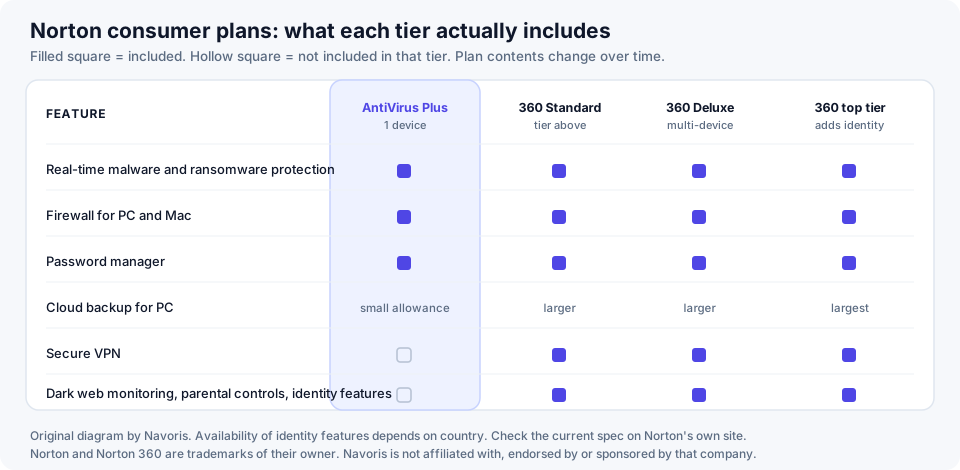
At the time of writing, Norton describes AntiVirus Plus as a single-device plan — one PC or one Mac — built around four things:
- Real-time protection against malware, including ransomware, spyware and the ordinary nuisance categories. This is the part that inspects files as they are written and opened rather than only during a scheduled scan.
- A firewall. On Windows this is Norton's Smart Firewall, which manages inbound and outbound connections per application; on macOS the firewall component is narrower.
- A password manager, as a browser extension with a vault synchronised through your Norton account.
- Cloud backup for Windows, with a small allowance. Norton has listed 2 GB for this tier; the exact figure is worth checking because Norton has changed backup allowances across its range more than once.
Norton also attaches its Virus Protection Promise to paid consumer plans — a money-back commitment if a Norton expert cannot remove a virus from your device. Like all such promises it comes with its own conditions, and those conditions are the part worth reading rather than the headline.
Everything in this section is taken from Norton's own published product description, not from our own laboratory work. Plan contents differ by country and are revised without notice. If what Norton publishes differs from what you read here, Norton's information prevails — and we would be glad to be told, so we can correct the page.
Partner link to the advertiser. Navoris is paid a commission if you subscribe through it; you pay the advertised price either way. Read the section below on renewal pricing before you commit.
What it does not include, and where those features live
This is the part that advertising tends to blur, so here it is flatly. The following are not part of Norton AntiVirus Plus:
| Feature | In AntiVirus Plus? | Where it actually lives |
|---|---|---|
| Secure VPN | No | Norton 360 tiers |
| Dark web monitoring | No | Norton 360 tiers |
| Parental controls | No | Norton 360 Deluxe and above |
| Webcam protection (SafeCam) | No | Norton 360 tiers |
| Identity-theft protection | No | Top Norton 360 tiers, and only in some countries |
| Cover for phones and tablets | No | Multi-device Norton 360 plans |
| Cover for more than one computer | No | Multi-device Norton 360 plans |
None of this makes the entry plan bad. A single-device antivirus with a firewall and a password manager is a perfectly coherent product, and for a household with one laptop it may be exactly the right amount of software. It does mean that if you were sold on the VPN or on dark web monitoring, this is the wrong plan, and buying it will leave you with a subscription that does not do the thing you bought it for.
An earlier version of this page — written before we took the site over — stated that Norton AntiVirus Plus included a VPN, dark web monitoring, 20 GB of cloud backup and coverage for five devices across Windows, macOS, Android and iOS. None of that was accurate for this tier. It has been removed and replaced with the table above. We have left this note here on purpose: a correction that is quietly deleted is not a correction.
How detection really works
People still picture antivirus as a list of known bad files. That was true in about 1995. A modern engine runs several independent checks, and a file has to survive all of them.
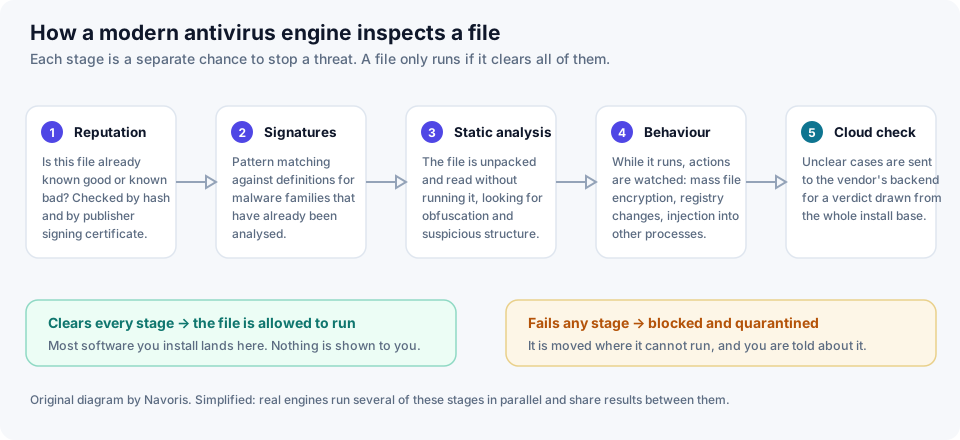
Reputation
Before anything is analysed, the file is looked up: has this exact file been seen before, on how many machines, for how long, and is it signed by a publisher with a history? A binary that appeared on forty machines worldwide in the last hour and is signed by nobody is treated very differently from one that has been on millions of machines for three years. This single check disposes of an enormous share of everyday traffic without any deep analysis at all.
Signatures
Pattern matching against definitions for families that have already been analysed. Signatures are cheap and exact, and they are the reason your product downloads updates constantly. They are also, on their own, useless against anything genuinely new — which is why no serious product has relied on them alone for twenty years.
Static analysis
The file is unpacked and read without being run. Heavy obfuscation, a packer associated with malware families, imports that only make sense for keylogging, a structure that does not match what the file claims to be — all of these are evidence, none of them is proof, and the engine weighs them.
Behaviour
The most important layer against ransomware specifically. Once code runs, its actions are watched: is it enumerating and rewriting thousands of documents? Injecting into another process? Deleting shadow copies? Establishing itself to run at boot? Behaviour monitoring is what catches a threat that has never been seen before, because it does not care what the file is — only what it does.
Cloud verdict
Ambiguous cases are escalated to the vendor's backend, which can bring far more analysis to bear and can see the same file appearing across a very large install base. This is also why a product with a big user base has a structural advantage: it sees new campaigns sooner.
Every one of these layers is probabilistic. A detection engine is a filter that makes successful attacks rarer, not a wall that makes them impossible. Any product — from any vendor — that is marketed as making you immune is being marketed dishonestly. That is precisely why the later sections of this article are about patching, passwords and backups rather than about software you can buy from us.
The firewall, in both directions
Windows and macOS both ship with a firewall, and both are reasonable. What a product firewall usually adds is finer per-application control over outbound traffic, and that is the half people forget.
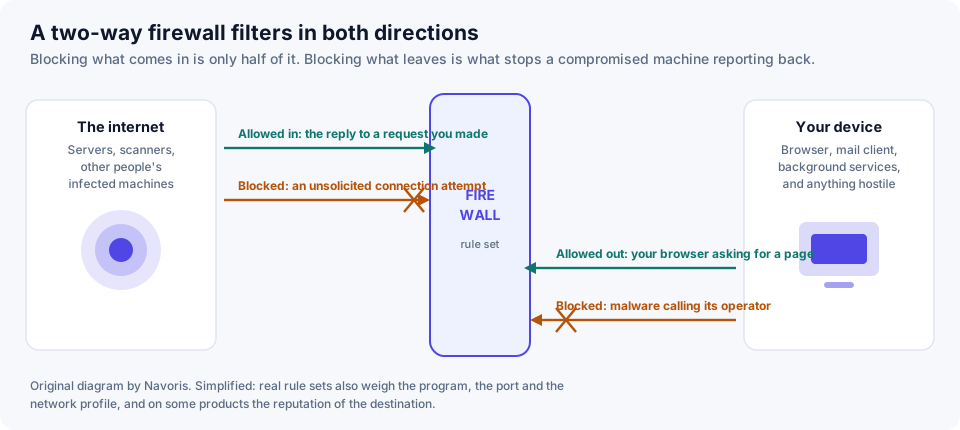
Inbound filtering is the obvious half: unsolicited connection attempts from the outside are dropped, while replies to requests you made are allowed through. On a home network behind a router this matters less than it did, because the router is already doing much of it. On a café or airport network it matters a great deal.
Outbound filtering is the half that earns its keep. Almost everything hostile needs to talk to somebody: to fetch the real payload, to receive an encryption key, to exfiltrate what it has found. A firewall that notices an unfamiliar process opening a connection to an unfamiliar host is cutting the chain at exactly the point where cutting it is still cheap.
Where an attack can be broken
It helps to stop thinking of "a virus" as a single event and to see it as a chain with four links. Each link is a separate opportunity, and the cost of intervening rises sharply the further right you go.
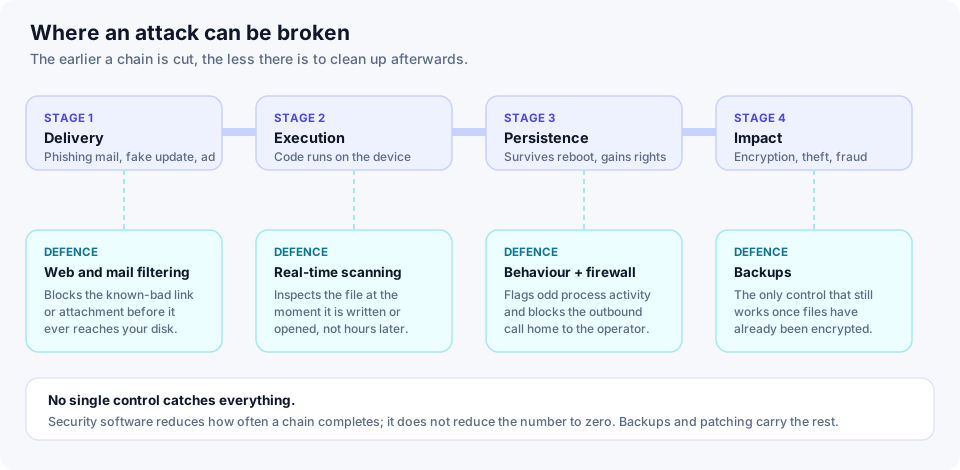
Notice what sits under stage four. Once files are encrypted, no antivirus product recovers them. The only control that still works is a backup the attacker could not reach. Any page that sells you security software without saying this is selling you half a plan.
Reading independent test results without being misled
You will see "99.9% detection" in a lot of advertising, including, until we rewrote it, on this page. We are not going to quote a single percentage, and here is why.
The serious public testing is done by a handful of laboratories — AV-TEST, AV-Comparatives and SE Labs are the best known. They re-run their tests every couple of months against live samples, they publish their methodology, and the scores move. A number lifted from one round and reprinted for two years is advertising, not evidence.
What is fair to say is the shape of the record: in these tests, the major paid consumer engines — Norton's among them — cluster tightly at the top of the protection category, and the differences between the leaders are usually smaller than the difference between using one of them and using none. Where products separate more visibly is in false positives and in performance cost.
If you want to check Norton specifically, go to AV-TEST or AV-Comparatives and read the most recent round yourself. It takes two minutes, it is free, and it is better evidence than any affiliate page — including this one.
Look at three things, not one. Protection: how many live threats were stopped. False positives: how often clean software was wrongly blocked, which is what makes a product annoying enough to be switched off. Performance: the measured slowdown on ordinary tasks. A product that wins on protection and loses badly on the other two is not the better product for most people.
Performance: where the cost actually lands
"It slows my computer down" is the oldest complaint about antivirus, and it is neither wholly true nor wholly false. The cost is real, but it is concentrated in specific operations rather than spread evenly.
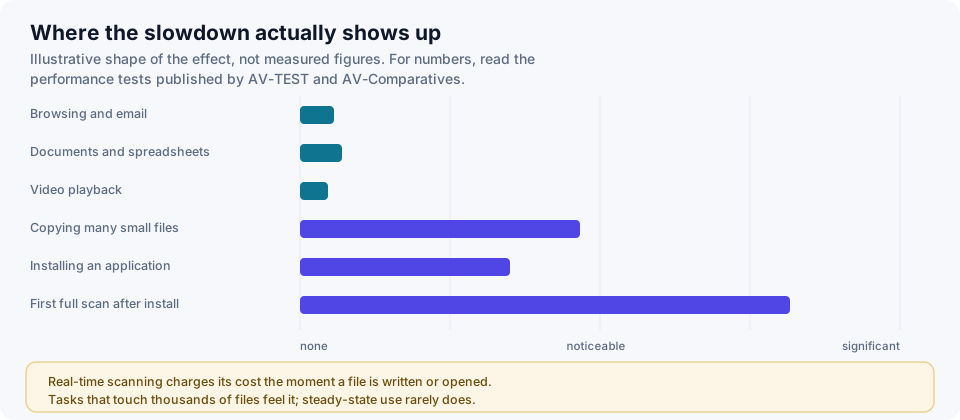
Real-time scanning charges its cost at the moment a file is written or opened. That is why browsing, writing documents and watching video barely register, and why unpacking a large archive, installing software or running the first full scan after installation feel noticeably slower. On a machine with an SSD and a recent processor most people never notice. On an old laptop with a mechanical disk, they do.
Do you need this if you already have Microsoft Defender?
It is a fair question and we would rather you asked it here than felt misled later. Microsoft Defender Antivirus ships with Windows, is switched on by default, costs nothing, and appears in the same independent tests as the paid products — where it generally performs respectably.
What a paid suite typically offers on top is not usually a dramatic difference in raw detection. It is the surrounding package: a password manager you would otherwise buy separately, cross-platform coverage from one licence, a firewall with per-application outbound control, cloud backup, a support line with a human on it, and a single console for several machines in a household. Whether that bundle is worth the annual fee depends entirely on whether you would use those parts.
Our honest position: if you run one up-to-date Windows machine, are careful about what you install, already use a password manager and already have backups, the marginal security gain from any paid antivirus is modest. If any of those clauses is not true of you — and for most households at least one is not — a paid suite is a reasonable purchase. We are paid on commission and we still think that is the accurate answer.
Antivirus is one layer, not the wall
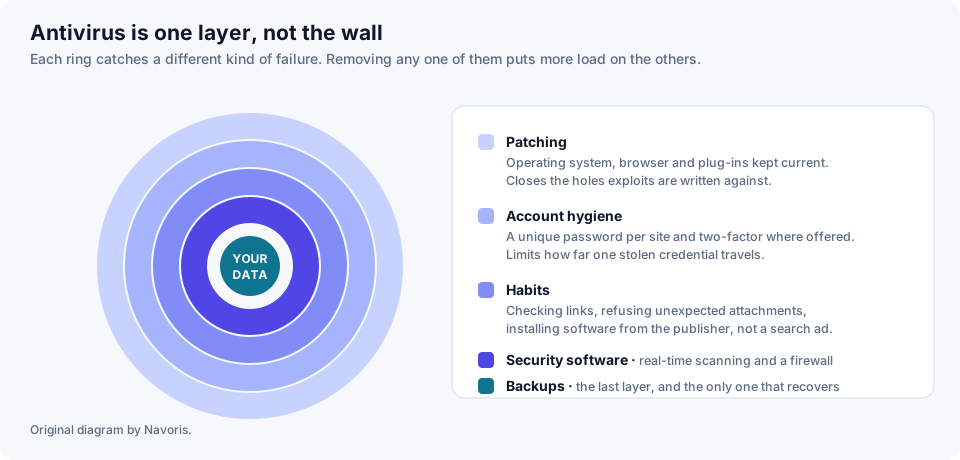
In rough order of how much risk they remove per unit of effort:
- Keep things patched. Operating system, browser, and anything with a network connection. Most exploited vulnerabilities have had a fix available for some time before they are used against ordinary people. Automatic updates are the single highest-return setting on your machine.
- A unique password per account, plus two-factor authentication. The most common way an ordinary person is harmed online is not a virus at all: it is a password reused on a site that was breached. A password manager fixes this, and one comes with the plan discussed here.
- Habits. Do not run attachments you were not expecting. Install software from the publisher rather than from a search advertisement — malicious ads impersonating well-known software downloads are a routine delivery method. Treat urgency in a message as a warning sign in itself.
- Security software. Real-time scanning and a firewall, catching what the first three let through.
- Backups. The recovery layer, and the only one that helps after everything else has failed.
Backups and the 3–2–1 rule
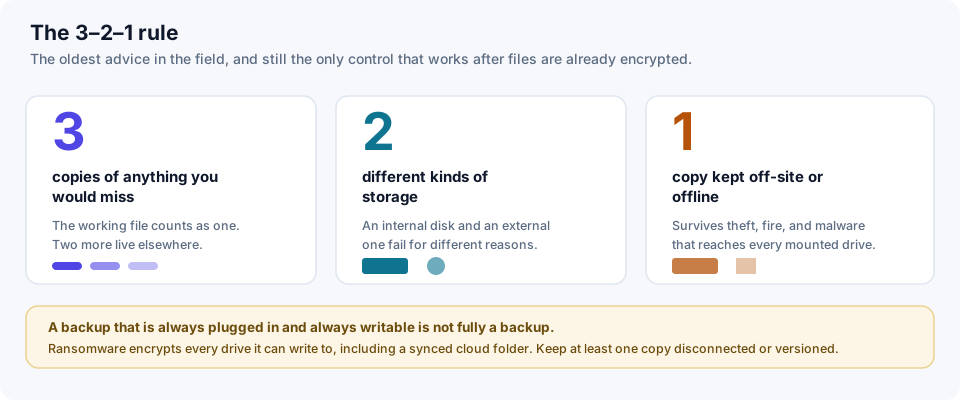
The small cloud backup allowance in the entry plan is useful for documents and not much else; it is not a substitute for a real backup of a whole machine. Whatever tool you use, the rule that matters is the old one: three copies, on two kinds of storage, with one of them somewhere the machine cannot reach.
That last clause is the one people skip, and it is the one ransomware exists to exploit. An external drive that is permanently plugged in and writable will be encrypted alongside everything else. A cloud folder that syncs continuously will faithfully sync the encrypted versions. Either keep a copy physically disconnected, or use a service with versioning and a retention window long enough that you can roll back.
Price, renewal and the refund window
We are not going to print a price. Norton's pricing varies by country and by promotion, changes frequently, and any figure we typed here would be wrong within weeks. The current price is on the advertiser's page. What we can usefully tell you is what to look at when you get there.
- The first-year price is a promotional price. This is standard across the whole security industry, not a Norton peculiarity. Subscriptions renew automatically at the standard rate, which is materially higher. Find the renewal price before you buy, not eleven months later.
- Note the renewal date and set a reminder. If you intend to shop around each year, put the date in a calendar the day you subscribe.
- There is a money-back window. Norton publishes a refund guarantee for annual consumer subscriptions — commonly described as sixty days, but the length and the conditions are set by Norton's own terms and are what actually binds. Read them on the checkout page.
- Check the device count matches your household. A single-device licence on a two-laptop household is a false economy; a five-device licence for one laptop is money burned.
We earn a commission when you subscribe. We would still rather you bought the right tier once than the wrong tier twice. If the table earlier in this article shows that what you actually want is a Norton 360 plan or a different product entirely, buy that instead.
Who this tier suits
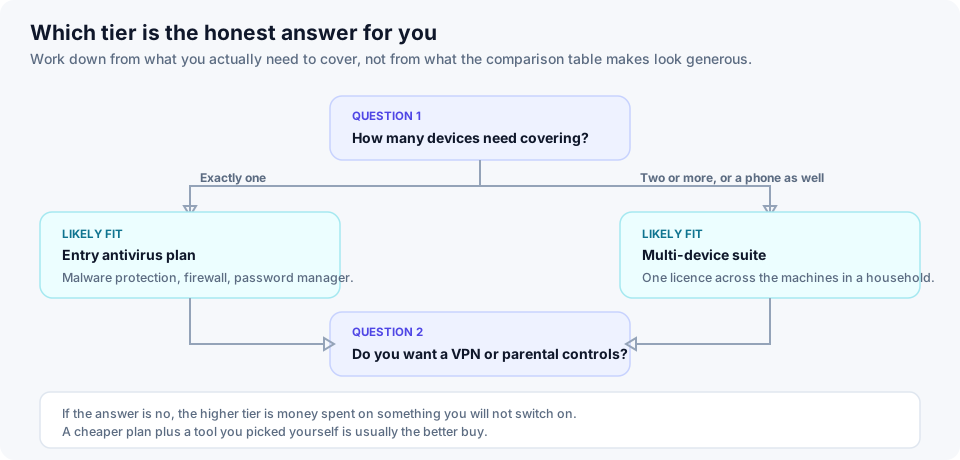
It is a sensible fit if
- You have one computer to protect and no interest in covering a phone with the same licence.
- You want real-time protection plus a firewall and would use a password manager.
- You are replacing an expired product or moving off something that was nagging you constantly.
- You want a support line you can telephone when something goes wrong.
Look elsewhere in the range, or elsewhere entirely, if
- You have several devices, or a household — a multi-device Norton 360 plan is the cheaper way to do that than several single licences.
- The VPN, dark web monitoring or parental controls were the reason you were interested. Those are higher tiers.
- You only want a VPN. Buy a VPN. A bundled one is a convenience, not a reason to buy an antivirus plan.
- You are on macOS and were expecting the full Windows feature set. Several components are Windows-only, including the cloud backup.
Our verdict, with the caveats attached
Norton AntiVirus Plus is a competent, conventional entry-level security product from a vendor with a very long record and a consistently strong showing in independent testing. For a single Windows or Mac machine it does the job it says it does: it scans in real time, it filters traffic in both directions, and it throws in a password manager that a lot of people would otherwise not have.
The caveats are the ones we have set out above and will not bury. It covers one device. It does not include the VPN, the dark web monitoring or the parental controls that feature heavily in Norton's advertising. The first-year price is promotional and renewal costs more. And no antivirus product — this one included — removes the need to patch your software, use unique passwords and keep a backup you can actually restore from.
If that description matches what you were looking for, the current offer is below. If it does not, we would rather you closed the tab.
Partner link. Navoris is paid a commission by the advertiser if you subscribe through it. You pay the same price as going direct, and the commission does not influence what is written above.
Sources, method and corrections
What we did. This article is a documentation and desk review. We read the vendor's published specification, the methodology and recent published rounds from the independent testing laboratories, and public guidance from European and national security agencies. We did not run our own laboratory benchmarks, and we do not present any number on this page as our own measurement. How we review sets this out in full.
Sources consulted:
- Norton's own published product and plan comparison pages at norton.com — the authoritative source for what any given plan contains, and the one that prevails over this page.
- AV-TEST Institute — bi-monthly protection, performance and usability testing of consumer security products.
- AV-Comparatives — real-world protection tests, malware protection tests and performance tests, with published methodology.
- SE Labs — full-chain testing reports.
- ENISA — the EU Agency for Cybersecurity, and its annual Threat Landscape report.
- CISA StopRansomware — practical guidance on ransomware prevention and recovery.
- Europol — the Internet Organised Crime Threat Assessment, for the shape of the criminal market.
Corrections made to this page. When we rebuilt this site we removed a number of statements that were not accurate: that Norton AntiVirus Plus includes a VPN; that it includes dark web monitoring; that it includes 20 GB of cloud backup; that one subscription covers five devices across Windows, macOS, Android and iOS; an unsourced claim that ransomware attacks had risen by over 70% in two years; an unsourced average breach cost figure; and a flat "99%+ detection rate" presented without a test, a round or a date. We also removed the framing of the article as a reader-submitted story, which it never was.
If we have something wrong, write to info@navoris.online and tell us what and why. We correct errors of fact in place, with a dated note saying what changed. Our editorial policy sets out the procedure.
Trademark notice. Norton, Norton 360 and Norton AntiVirus are trademarks of Gen Digital Inc. or its affiliates. Navoris is an independent publication operated by DIVISTAR s.r.o. and is not affiliated with, endorsed by or sponsored by Gen Digital Inc. or any other company named here. Product and company names are used for identification only. All illustrations on this page were created by Navoris and are original work.
Not advice. This article is general information about consumer software. It is not professional security advice for your particular circumstances, and buying any product is your decision.