
How antivirus software actually works
Five layers, in the order a file meets them — and an honest account of the three categories of harm that no detection engine can reach.
Antivirus software has a reputation problem: most people picture it as a list of known-bad files, checked once a week. That description was accurate in the mid-1990s and has been wrong for two decades. Understanding what the software actually does makes it much easier to judge what it can and cannot protect you from — and to spot advertising that overstates the case.
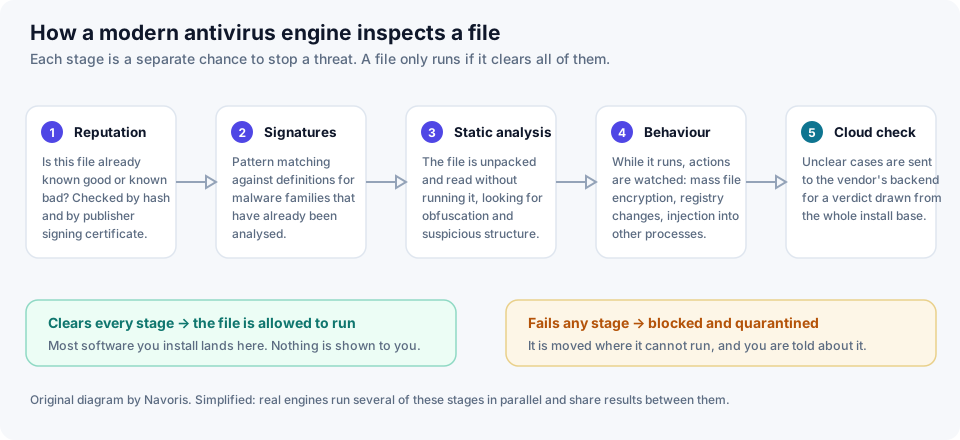
1. Reputation: has the world seen this before?
The cheapest check runs first. The engine takes a cryptographic hash of the file and asks the vendor's service what is known about it: how many machines have it, for how long, and is it signed by a publisher with a track record?
This disposes of most traffic instantly. A copy of a mainstream browser installer that has been on tens of millions of machines for years needs no further thought. A freshly compiled binary that appeared on forty machines in the last hour, signed by nobody, is treated as suspicious on those grounds alone — before anybody has looked at what it contains.
2. Signatures: pattern matching against the known
Signatures are compact descriptions of malware families that analysts have already taken apart. They are exact, they are cheap to evaluate, and they are the reason your security product downloads definition updates constantly.
Their weakness is obvious: a signature only recognises something already catalogued. Attackers respond by regenerating their payloads continuously, so that each victim receives a file no one has seen before. This is why signature matching has not been the primary defence in any serious product for a very long time — it is a fast first pass, not the answer.
3. Static analysis: reading without running
The file is unpacked and inspected while inert. The engine looks at structure rather than at a known pattern: is the code heavily obfuscated? Is it wrapped in a packer strongly associated with malware? Does it import functions that only make sense for keystroke capture or process injection? Does its structure match what its extension and icon claim?
Each of these is evidence rather than proof. Legitimate software is sometimes packed and obfuscated too, usually to protect against copying. The engine assigns weights and produces a score.
4. Behaviour monitoring: watching what it does
This is the layer that matters most against anything genuinely new, and it is the reason ransomware is sometimes stopped a few files in rather than not at all.
Once code executes, its actions are watched against patterns of intent: enumerating the user's documents and rewriting them in sequence; deleting volume shadow copies; injecting into another process; writing itself into a location that runs at startup; contacting a host that nothing else on the machine has ever contacted. Behaviour monitoring does not care what the file is. It cares what the file does, which is much harder for an attacker to disguise, because the malicious behaviour is the product.
5. The cloud verdict
Where the local engine is unsure, the sample or its telemetry goes to the vendor's backend, which can apply far heavier analysis — including detonating the file in a sandbox — and can see the same object appearing simultaneously across a very large install base. A campaign that starts at nine in the morning can be recognised as a campaign by half past, and the verdict pushed back to every installation.
It is also why the size of a vendor's user base is a genuine technical advantage rather than just a marketing line, and why a security product necessarily sends some information about your files to its maker. That is a real privacy trade-off, and it is worth reading what a vendor says it collects.
What none of it can do
Every layer above is probabilistic. Together they make a successful attack considerably less likely; they do not make it impossible, and any vendor or affiliate page implying otherwise is misleading you.
Three things in particular sit outside the reach of a detection engine:
- You, deciding to install something. If you download a program, click through the warning and grant it administrator rights, you have overridden the machinery on purpose. Malicious search advertisements impersonating well-known software downloads work on exactly this principle.
- Credential theft on a website. If you type your password into a convincing copy of your bank's login page, nothing was executed on your computer at all. There is no file for antivirus to find.
- Damage already done. Once files are encrypted or data is exfiltrated, detection is no longer the relevant tool. Backups are.
An antivirus engine is a filter that makes bad outcomes rarer. Treat any claim that it makes you safe as advertising.
Related: spotting a phishing message covers the category that detection engines are structurally worst at, and ransomware and backups covers what to do about the damage they cannot undo.